

Documents
Per-brand document repository. Upload PDFs, Word files, Markdown, CSVs, and Excel sheets, then attach them as context when running the Brand Profiler, Research, Strategy, or Media Plan.
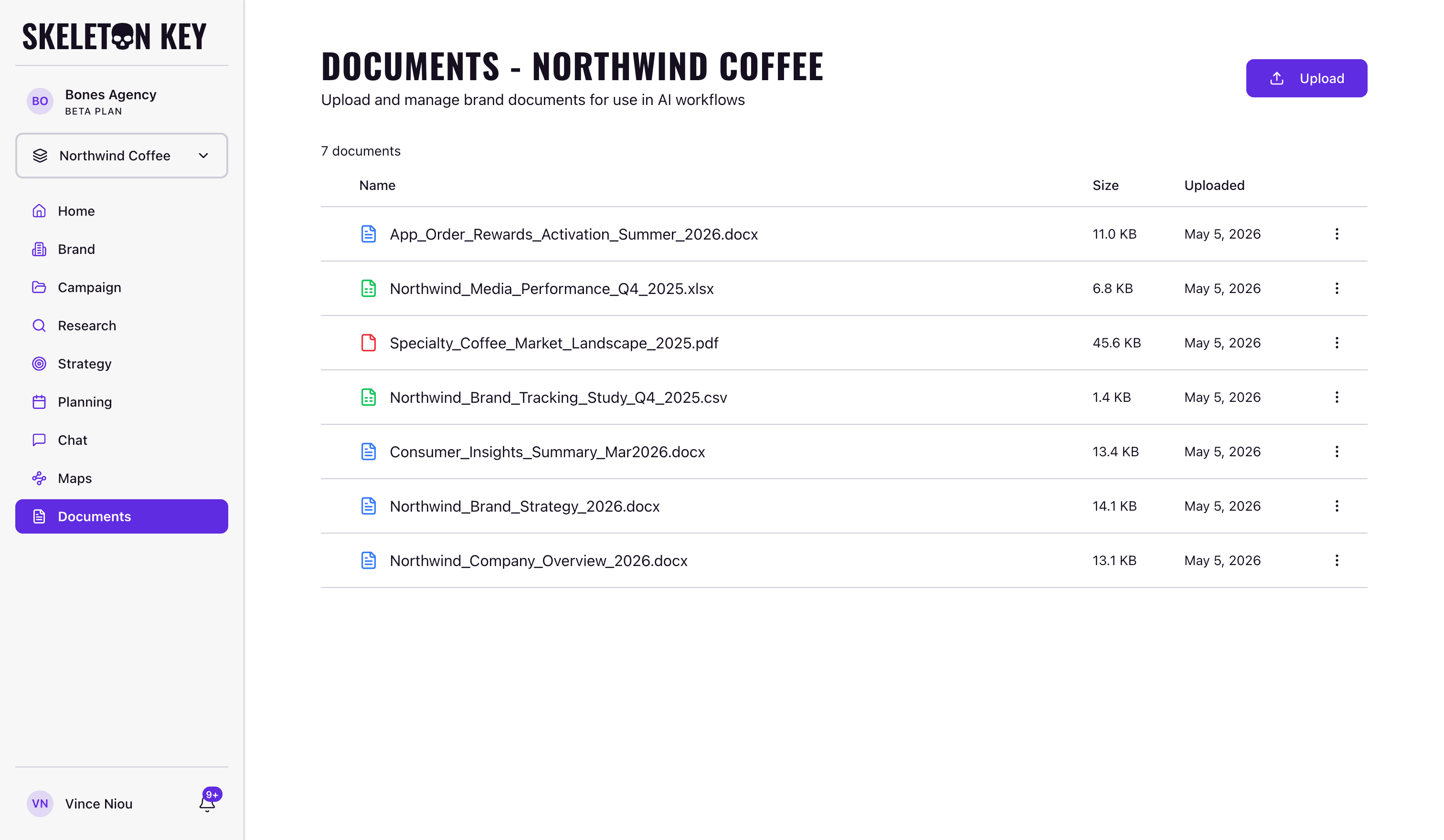
Documents is the file store for a Brand. Upload reference material once, then pull it into any Brand Profiler, Research, Strategy, or Media Plan run without re-uploading each time.
What it does
Each Brand has its own isolated document library. Files stay until you delete them, regardless of how many runs come and go. This is different from the brief upload in the Campaign form, which is a one-shot extraction. Documents is persistent storage you can reference across multiple runs.
Accepted formats: PDF, DOCX, XLSX, CSV, and MD. Each file must be under 10 MB.
Where to find it
Click Documents in the left sidebar. The page shows the library for the currently active Brand; switching the brand selector loads a different library. A Brand Profile must exist before Documents is accessible. If you haven't run the Brand Profiler yet, the page shows a guard.
Viewer-role accounts can view and download documents, but cannot upload, rename, or delete.
How it works
Click Upload (top right) or drag files onto the page. Uploads run one at a time; a progress panel in the bottom-right tracks each file's status. If a file fails, a retry button appears there.
If a dropped file has the same name as an existing document, a dialog asks whether to replace or keep both. Choosing "keep both" renames the incoming file automatically (e.g., brief (1).pdf).
When you start a Brand Profiler, Research, Strategy, or Media Plan run, a document selector appears at the dispatch point. Documents are opt-in per run: checking a file includes it as agent context for that run only. No documents are attached automatically.
What you can adjust
Each document row has a three-dot menu (or right-click context menu) with three actions:
- Rename: changes the file's displayed name. If the save fails, the change reverts.
- Download: saves the file to your computer.
- Delete: permanently removes the file after a confirmation dialog.
Select multiple rows to use the bulk action bar at the bottom of the screen: download or delete all selected files at once.
Limits and considerations
- 10 MB per file. Files above this limit are rejected at validation before uploading starts.
- Five formats only. PDF, DOCX, XLSX, CSV, and MD are accepted. Other extensions (including
.doc,.txt,.png, and.pptx) are blocked. - Deletion is permanent. There is no trash or restore. Old runs that referenced a deleted document retain their run record, but the document name no longer resolves in run details.
- Documents page requires a Brand Profile. If the Brand Profiler hasn't run yet, the page shows a guard prompting you to complete Brand setup first.
- No folder structure. All files for a Brand sit in a flat list; use descriptive filenames to stay organized.
Last updated: 2026-05-05